Home » Games » Roblox » Macro: Anime Expeditions ( Roblox ) Farm Villian Coins get to the right point
Anime Expeditions ( Roblox ) Farm Villian Coins get to the right point
Description
The macro "Anime Expeditions ( Roblox ) Farm Villian Coins get to the right point" for "Roblox" can be downloaded and used on any mouse and keyboard.
Installing the macro is quick and easy in the Keyran program and increases your skill level in Roblox, if you follow the instructions!
Version: 1.0

Game: Anime Expeditions (Roblox)

Event: Invasion of the Villains, Act 1 (Sparrow's Hideout – Act 1)

Macro description:
This macro is designed to automate the passage of the first stage of the limited Villain Invasion event. The main task is to effectively achieve the key point, which will then allow you to activate the second macro to further automate the gameplay, including collecting Villain Coins and valuable items such as the Dark Scepter.

Please note: This macro is the first stage in a two-stage pharma system. It does not address complex combat mechanics, but focuses solely on providing stable access to the match and its start. Users will be able to focus on further character development and resources after completing this first leg of the process.
Information
Author: Ben4ick
Game: Roblox
Update: 07/30/2026 12:51:25
Rating:
0/5
Download
Free download macro «Anime Expeditions ( Roblox ) Farm Villian Coins get to the right point» for «Roblox». To use it, read the installation instructions.
Download
Size 1.75 Kb | Downloaded 44 times
Comments (~)
Loading comments
Only authorized users can leave comments
Send
Loading comments
Show more
6 дней назад..
0
0
Пример сообщения..
Answer
Edit
Cancel
Save
We save..
+N points
Changed
Home » Games » Roblox » Macro: Anime Expeditions ( Roblox ) Farm Villian Coins get to the right point
© 2016 - 2026 Keyran - program for creating and running macros | User agreement | Privacy Policy | Site Map
Instructions for installing a macro
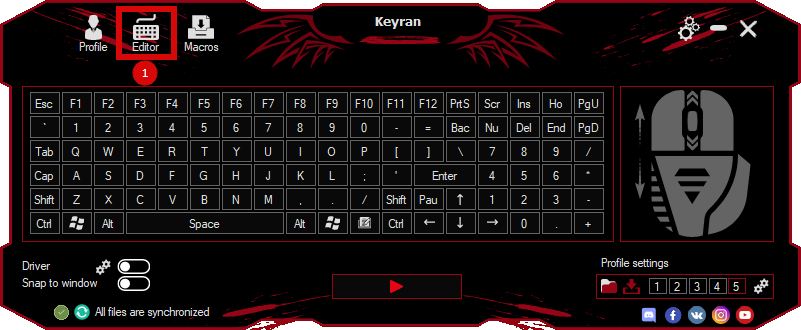
Download and install the Keyran program. Let's go to the macro editor.
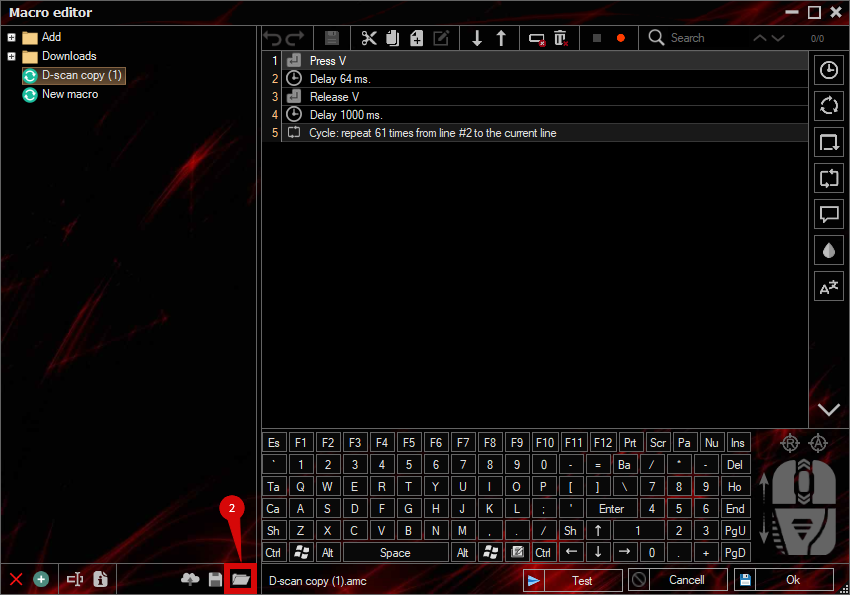
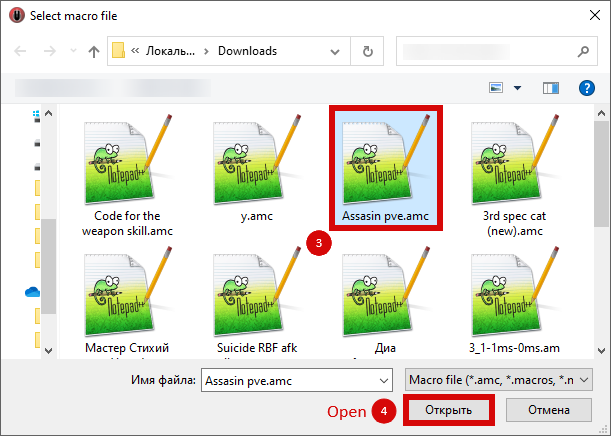
Click the «Open File» button and select the downloaded file.
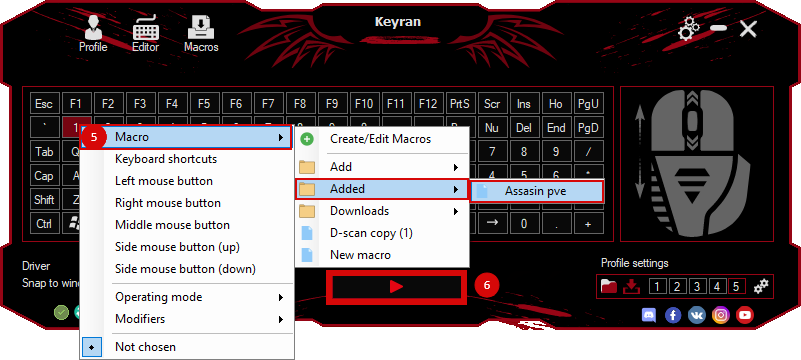
Assign a macro to a key and run the program.
Содержимое сообщения